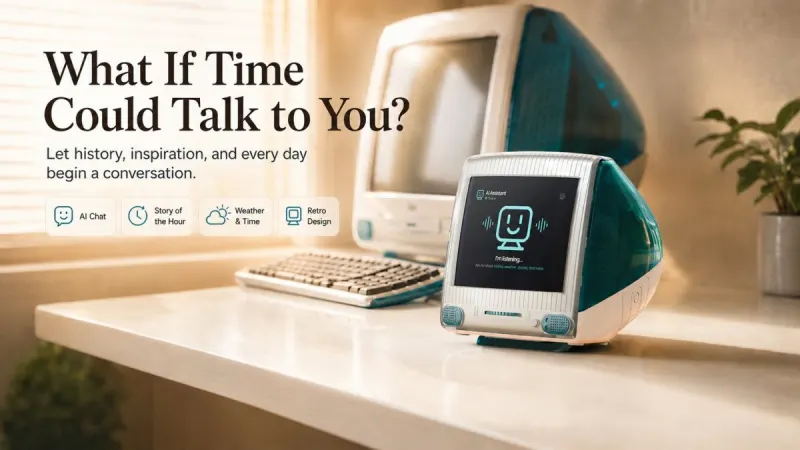
Retro AI Desk Clock That Turns the Hour Into a Story
The TimeCapsule G3 is a retro AI desk clock and desktop companion styled after a beloved vintage computer, with a clock, alarm, reminders, Bluetooth speaker, and hourly history moments. It is the kind of object you notice before you need it: a small, familiar silhouette on a desk, bedside table, studio shelf, or creative corner, inviting a second look and then a question.
Most clocks tell you the hour and move on. This one is designed to make the hour feel like a prompt. Every hour, it can surface a meaningful moment from history—a technology breakthrough, a space mission, an invention, or the story of someone who changed the world—and then let you dig deeper with AI-powered conversation. Instead of “What time is it?” the question becomes “What happened at this time?” and “Why did it matter?”
What Makes This Retro AI Desk Clock Stand Out
- Vintage-computer look: A retro-inspired silhouette that gives a desk the charm of classic electronics without pretending to be a museum piece.
- Classic and Neo displays: The Classic Edition uses a segment display for a clean, nostalgic read, while Neo adds a full-color IPS screen and a completely upgraded visual experience.
- Hourly history moments: The clock can share a moment from history every hour and turn it into a conversation with follow-up questions about why it mattered.
- Everyday desk functions: It works as a clock, alarm, reminder tool, and Bluetooth speaker, so it earns its place beyond the novelty.
- WiFi unlocks more: With WiFi, Neo opens AI conversations, historical stories, and smart features; without WiFi, the Neo version works like the Classic version.
- Five colors to choose: You do not pick a color at pledge time; after the campaign, a Kickstarter survey lets you select from five planned colors.
Who the TimeCapsule G3 Is For
It is for the gadget lover who already has the usual desk toys and wants something with a little more personality. It is also for history buffs who like the idea of a fact arriving at the right moment, and for desk-setup enthusiasts who care as much about the object on the shelf as the screen in front of them. The retro-computer shape gives it a talking point before anyone even presses a button.
As a gift, it fits birthdays, Father's Day, Christmas, or an original office gift for someone who enjoys retro design, conversational AI, or small objects with a story. It is not a generic clock with a new coat of paint; it is a conversation starter for someone who likes to ask “why?” after the hour turns.
What Is Worth Knowing Before You Choose It
This is a Kickstarter project, not a finished off-the-shelf retail product. The data describes an early 3D-printed prototype with the screen powered on and working, while surface texture, material finish, screen brightness, display quality, button and speaker details, internal structure, software interface, AI experience, and final colors are still being refined. The available information does not include measurements, weight, materials, battery details, or a full technical spec sheet, so check those before you commit if they matter to you.
The AI conversations, historical stories, and smart features depend on a WiFi connection; without WiFi, the Neo version behaves like the Classic version. Color choice comes after the campaign through a Kickstarter survey, not at the moment of pledging. The data does not say whether this is a limited edition or made to order, and it does not make the final production timeline clear.
If you want a desk object that gives the hour a little more meaning, go see the TimeCapsule G3 campaign and picture it on your desk—or wrapped for someone who would get a kick out of it.