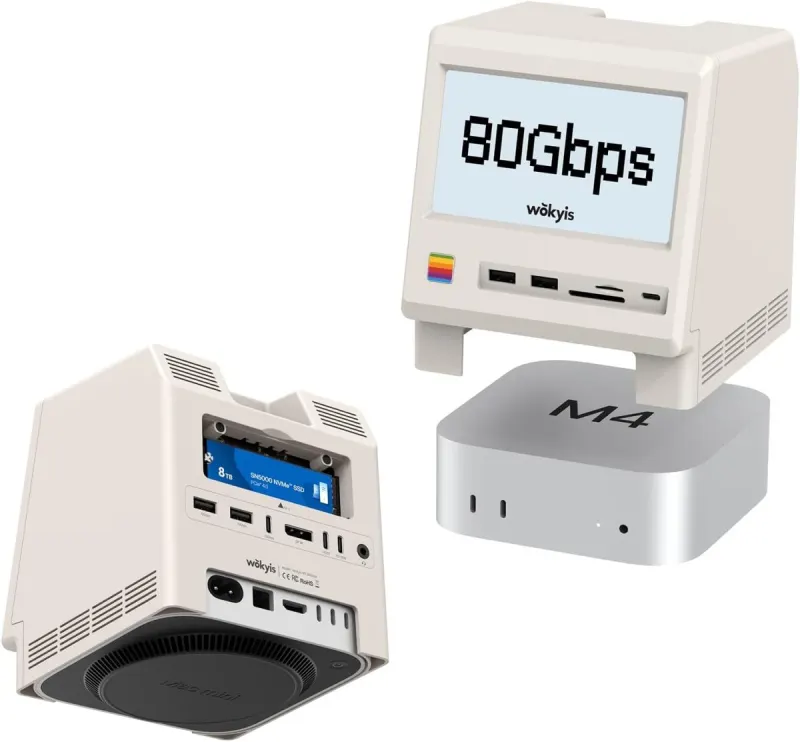
Mac Mini Retro Dock: A 1984 Face With an 80Gbps Engine
The Mac mini retro dock is a WOKYIS docking station shaped like a classic Macintosh, built to hold a modern Mac mini M4, M5, or M6 and turn it into a more capable desktop hub. It is not a novelty shell: inside, it adds an 80Gbps M.2 NVMe SSD enclosure with a cooling fan, a 5-inch HD display, an SD/TF reader 4.0, and an 8K@60Hz DisplayPort output.
That combination is what catches the eye. The retro silhouette gives Apple fans a familiar desk companion, while the hidden Thunderbolt 5-ready hardware gives programmers, designers, and desk-setup obsessives a reason to keep it there. Slide the Mac mini into the dock, and the cable clutter and the search for the card reader both ease a little.
Standout Features That Earn Their Desk Space
- Thunderbolt 5-ready 80Gbps bay: The M.2 NVMe enclosure is built for theoretical bandwidth up to 80Gbps and is backward compatible with Thunderbolt 4, Thunderbolt 3, and USB4. The data lists theoretical test speeds up to 7000MB/s, with 8K video editing, large file transfers, and high-performance gaming as the intended uses.
- Cooling fan inside: The SSD enclosure includes a cooling fan, a practical detail when the dock is also handling large file transfers and 8K video work.
- 5-inch HD display: The 1280×720 screen offers about 290 PPI clarity for notifications, monitoring apps, a digital clock, music lyrics, or a small photo frame.
- 8K@60Hz DisplayPort 2.1: A single-display output up to 8K@60Hz turns the setup into a high-resolution workstation for content creators and design professionals.
- SD/TF reader 4.0 and 6 total USB ports: The dock adds a card reader and USB connectivity, with 13 ports in total, so cameras, drives, and peripherals have a place to land.
- Space-saving slide-in design: The Mac mini slides directly into the dock, reducing cable clutter and creating a streamlined vintage-modern workstation.
Who Will Love This Retro Mac Hub as a Gift
This is an easy gift for the Apple fan who remembers the original Macintosh and still wants a clean, modern desk. Programmers, designers, and content creators get the practical side: fast storage, a card reader, extra ports, and an 8K output in one place. Desk-setup obsessives get the fun side: a vintage-looking centerpiece that hides the hub work underneath.
It fits birthdays, Christmas, Secret Santa, and housewarming gifts for someone building a home office. It also works as a work-from-home upgrade for a Mac mini owner who wants fewer dongles and a little more personality on the desk. If you are giving it to a MacBook Pro, Windows, or Android user, check that their device supports Thunderbolt and DisplayPort first.
What to Know Before You Buy
Power matters. The product notes ask you to plug in a PD 36W power supply to keep the M.2 drive and other USB devices stable, so plan for that connection. Speed is a ceiling, not a promise: the 80Gbps bandwidth and up to 7000MB/s test figure are theoretical, so treat them as ceilings rather than guaranteed everyday speeds. The dock is aimed at Mac mini M4/M5/M6 and also lists MacBook Pro, Windows, and Android devices that support Thunderbolt and DisplayPort; a device without those protocols will not get the full benefit. This is a desktop dock designed for a slide-in Mac mini, so it makes most sense as part of a desktop setup.
If you want a desk piece that makes an Apple fan smile and gives their Mac mini more room to work, take a closer look at this retro dock and picture it on their desk.